

The chat and social templates now look like the apps people use today, with group chats, photos, voice notes, reactions, and your own profile pictures. New iMessage-style and Messenger-style chats, a story, a community poll, and a subscriber milestone join them.
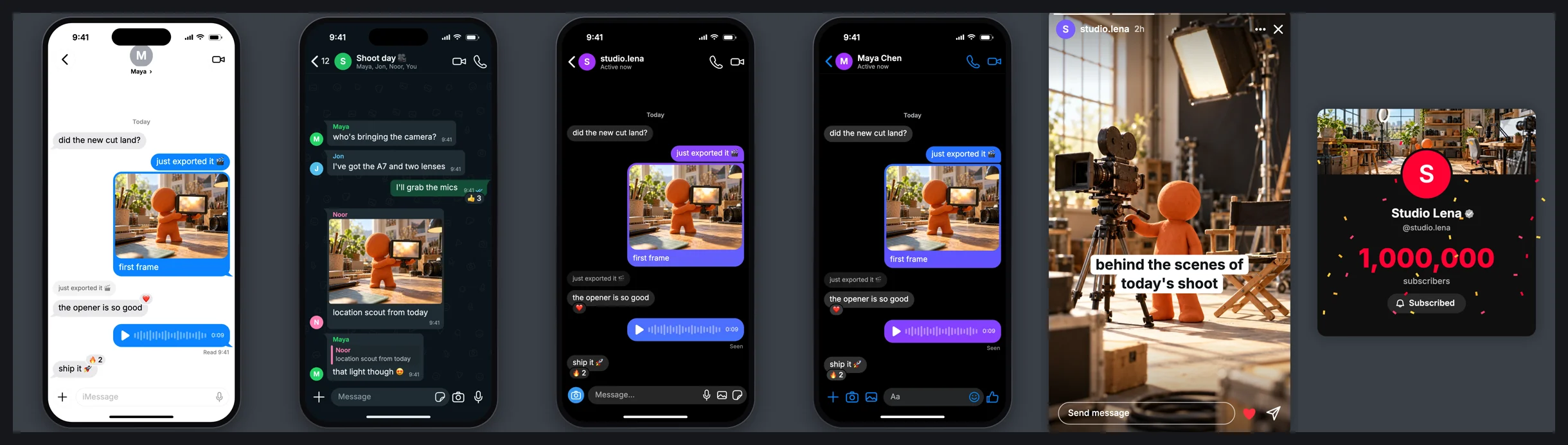
Chats in a real phone
Every chat sits in a phone with a status bar, the app's header icons,
wallpaper, and message box. Turn off Phone frame to show just the screen.
Write the conversation one message per line. Start a line with a name, like
Maya:, and it becomes a group chat with each sender's name, colour, and
picture. Add [photo], [voice 0:14], or [reply Maya: text] before the
words and {❤️} after them for a photo, a voice note, a reply, or a reaction.
The iMessage-style chat has a green text-message mode for prank videos, and the Messenger-style chat shifts its gradient down the screen.
More posts
The X-style post can carry a photo or a link card. The vertical video overlay comes in TikTok, Reels, and Shorts styles. New: an Instagram-style story, a YouTube-style community post with a poll that fills in, and a Creator milestone card whose subscriber count ticks to a round number before the confetti falls.
Presets for the videos you make
Pick a preset to fill in a whole look and script: Storytime, Text prank, Brand review, Product launch, Podcast clip, Educator Q&A, Gamer raid, Startup team, Creator milestone, or News reaction. Your own words stay when you switch looks.
Your own pictures
Select Upload beside Contact picture, Profile picture, a sender's picture, or a post picture to use your own image. Until you do, the templates show sample photos. You can also drag the phone, card, caption, or side rail anywhere on the canvas.